Payments
Every kobo that moves through ShortletBox lands in one append-only ledger. Rows are never edited or deleted (a refund is a new row pointing at the row it reverses), so the ledger is always the full story, and every balance on every screen is computed from it.
The ledger
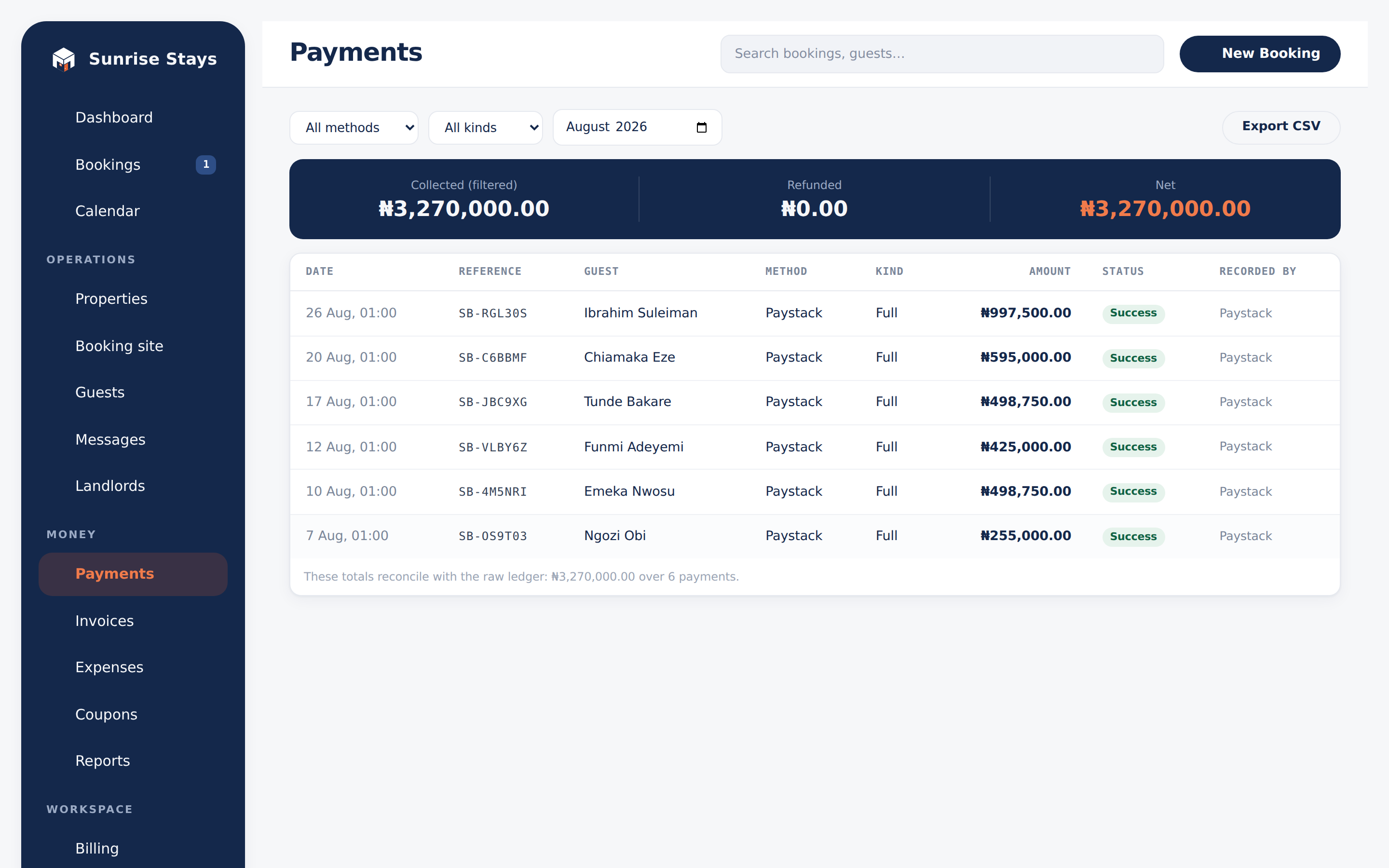
Section titled “The ledger”Payments in the sidebar shows the global ledger: filters by method (Paystack, cash, bank transfer, POS), kind (deposit, balance, full, refund, installment) and month; a Collected / Refunded / Net stat band; and CSV export. Failed online attempts stay visible for reconciliation.
Deposits
Section titled “Deposits”Each property sets its deposit policy: full payment up front, a percentage of the (post-discount) total, or a fixed amount. You can override the deposit on any booking you create yourself.
Pay-by-link
Section titled “Pay-by-link”When you approve a booking that has money owing, the guest receives a payment link:
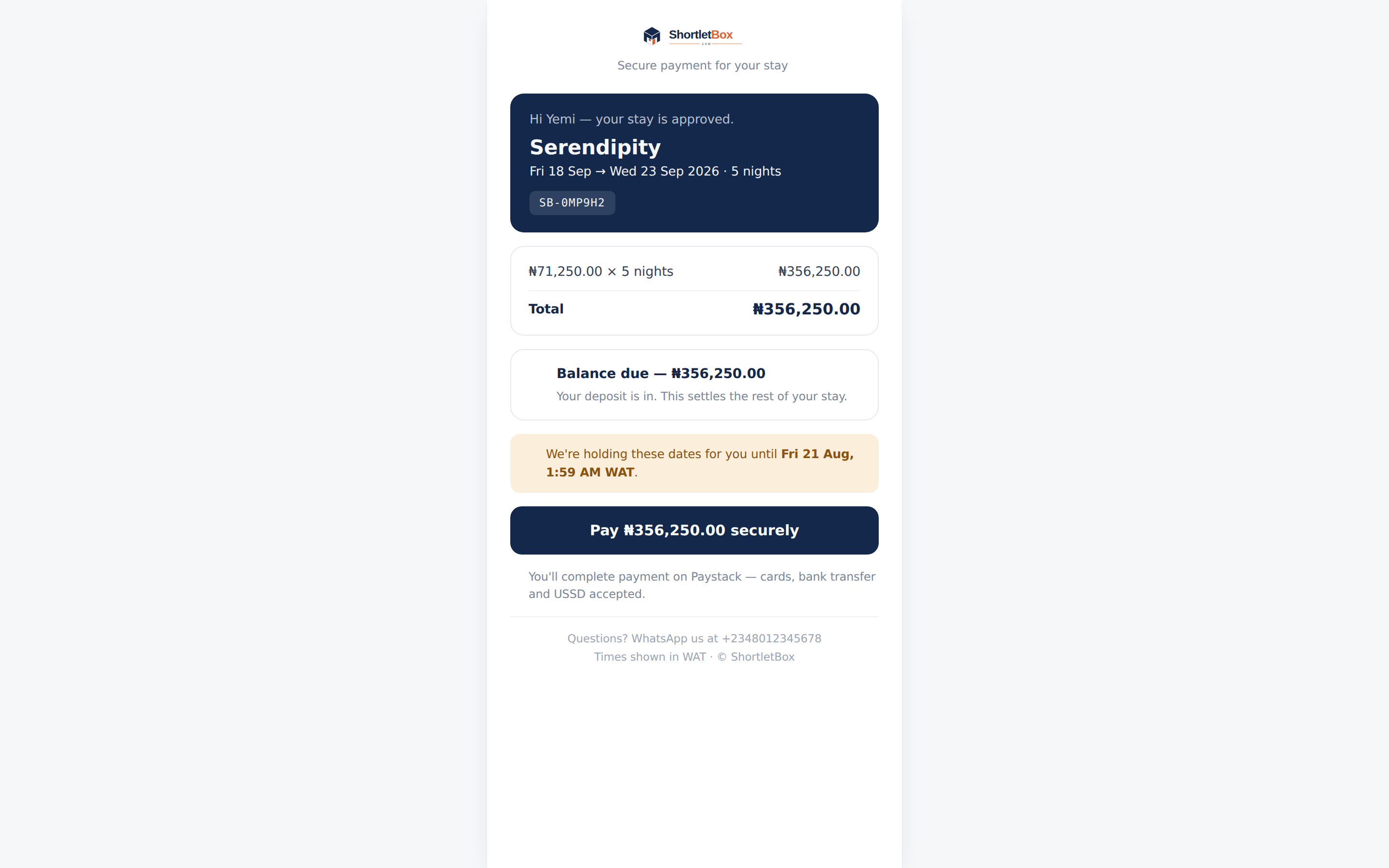
- The page offers deposit or full payment when there’s a genuine choice, otherwise it asks for exactly what’s outstanding.
- Payment runs through Paystack checkout (card, bank, transfer).
- The status page the guest returns to only ever reports. Confirmation is always driven by Paystack’s verified webhook, so a booking can never be confirmed by someone refreshing a page.
- Unpaid links are covered by the payment hold (default 48 hours); balance links live until checkout. A balance reminder email goes out three days before arrival.
You can resend a payment link from the booking page at any time, and record offline payments (cash, transfer, POS) directly on the booking.
Installment plans
Section titled “Installment plans”For stays paid in parts, set up an installment plan on the booking: the schedule says what’s due when, the ledger stays the truth about what’s been paid, and reminder/overdue emails go out automatically. Replace or remove a plan from the booking page.
Refunds
Section titled “Refunds”Refunds are recorded manually from the booking page and write a reversal row into the ledger. Nothing is un-charged; the history stays intact.
Payout verification
Section titled “Payout verification”Guest card payments settle to your own Paystack account at the moment the guest pays. ShortletBox does not hold that money and pay it out after check-in. Card payments are available only after three things are true: your workspace is on a paid plan, this identity check has been approved, and ShortletBox has turned payment routing on for the account. Submitting the check does not switch payments on by itself, and it does not move any guest money.
The check lives in Settings, on the Identity & payout verification card. Only the workspace owner can start it. A self-serve workspace that has not been verified is limited to 5 bookings a month until it clears; a paid plan does not lift that cap on its own.
A Free workspace sees Choose a plan instead of the form. Nothing is submitted until you are on a paid plan and you consent on the next screen.
Start the check
Section titled “Start the check”- Choose who owns the payout account.
- Individual — an account in my own name. This is the personal check (KYC). The bank account must be in the same name as your NIN.
- Registered business — a company (RC) or business name (BN). This is the business check (KYB). Enter the RC or BN number exactly as it appears on your CAC certificate.
- Choose the bank and enter the 10-digit account number.
- Choose Start verification.
The next screen shows the bank name and the last four digits of the account. For a registered business it also shows the RC or BN number. Confirm that this is the right account, then:
- If the form asks for a first name and surname, enter them exactly as they appear on your NIN and on the ID you will photograph. All three are compared, and a mismatch stops the check.
- Enter the 11-digit NIN. For a registered business this is the director’s or proprietor’s own NIN, not a company number.
- Tick the consent box. It names who receives your NIN, and that the bank details are checked with Youverify to confirm the account name. A photo check also asks you to consent to a photo of your ID, a photo of your face, and a check that you are present.
- Choose Submit verification.
ShortletBox stores a protected fingerprint of the NIN, not the number itself.
Individual (KYC)
Section titled “Individual (KYC)”Use this when the payout account is in your own name.
- Your NIN is checked against the identity provider named on the consent.
- The bank account name must match that identity. An account in a company’s name will not pass this path. Go back, choose Registered business, and add the RC or BN number.
- When the check includes a live photo, you are taken to a secure page to photograph your ID and take a selfie. It takes about two minutes. If you close the tab, Settings keeps a Continue verification link until you finish. Use your original ID, in good light, not a photocopy or a photo of a screen.
Registered business (KYB)
Section titled “Registered business (KYB)”Use this when payouts should go to the business’s own account.
- The RC or BN number is looked up on the CAC register. The business must be listed, and listed as active. A number that is not on the certificate, or a business that is not active, is refused before the NIN is sent.
- The bank account must be in the business’s registered name, as it appears on the CAC register. An account in a director’s personal name does not pass this path.
- You confirm that you are a director or proprietor, and your own NIN must match a person who controls the business.
- The same photo steps apply when the identity check asks for them. The name on the NIN, the name you typed, and the name on the ID must agree.
While it is in progress
Section titled “While it is in progress”The card on Settings is the status:
| Status | What it means |
|---|---|
| Verification pending | The identity or bank check is still running. If a Continue verification button is showing, the photo step is waiting on you. |
| Manual review | A specialist is reviewing the result. For a business, that review covers the CAC registration, the director link, and the bank-account name. |
| Verified | The approved account is shown by name and last four digits. Contact support before changing those details. |
| Verification rejected | The card says what to change: an unfinished photo step, an ID in a different name from the NIN, a bank account in the wrong name, or a business account that is not in the registered name. Fix that and choose Try verification again. |
Too many attempts in an hour pause new submissions until the hour has passed. Nothing already submitted is lost.